Computer Science for your homeschool
Your child writes a program, tests it, works out why it failed, and improves it. The code gives them something concrete to explain.
A lesson built around your child
A route planner is not magic: it represents a world as a graph, follows a rule for exploring it, and makes tradeoffs about time, memory, and accuracy.
- Lesson
- The Algorithm That Chooses Your Route
- Goal
- Represent a route problem as a graph, compare two search strategies, and use test cases to explain an algorithm's limits.
How a lesson works
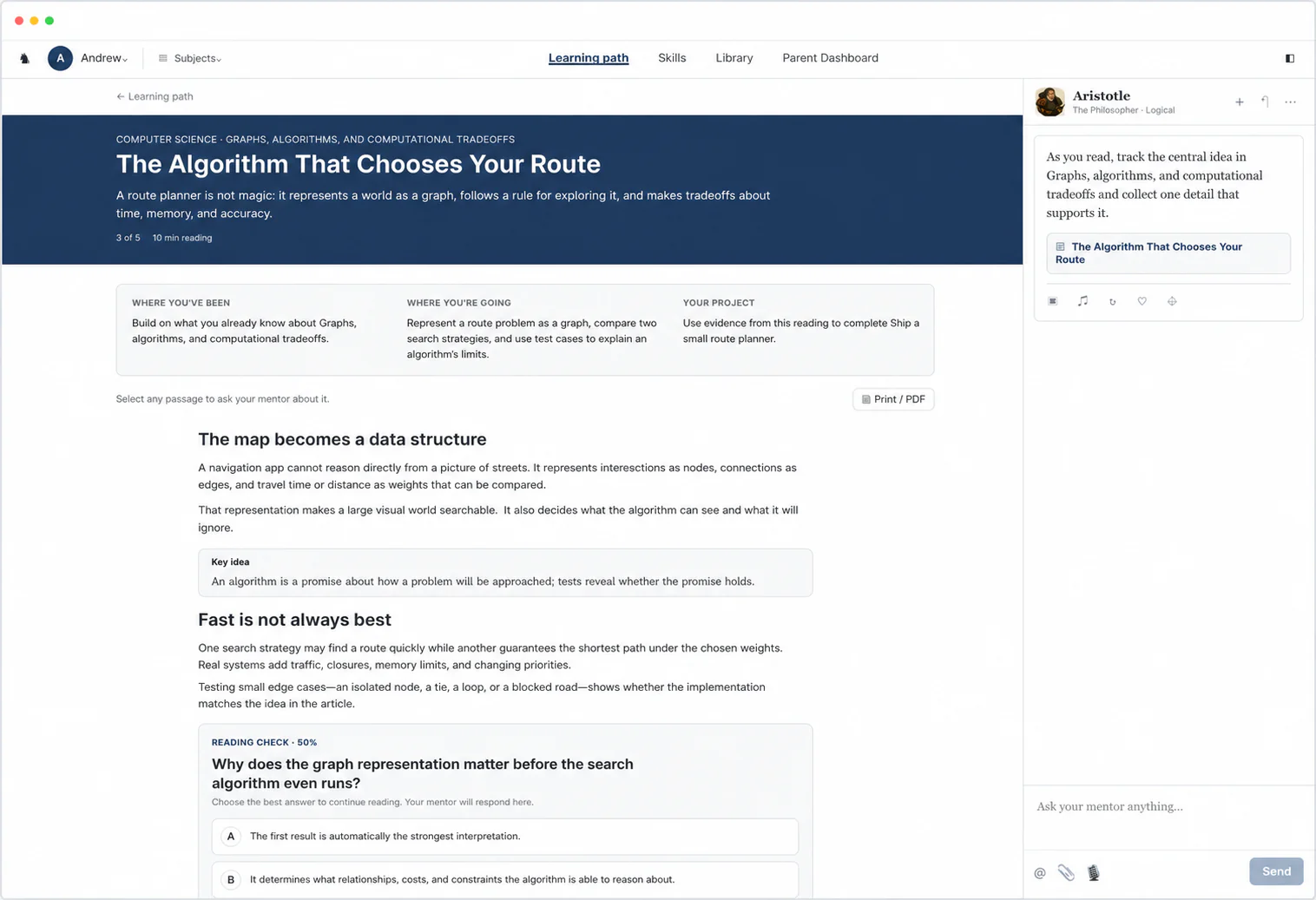
A 10-minute reading
This example lesson comes from the unit on graphs, algorithms, and computational tradeoffs. It moves from “The map becomes a data structure” to “Fast is not always best” and builds to one idea: an algorithm is a promise about how a problem will be approached; tests reveal whether the promise holds.
Help inside the reading
When code breaks, our Always-On Mentor can ask what your child expected it to do and help them test the next idea instead of supplying the code. Your child can also highlight any line of “The Algorithm That Chooses Your Route” to ask about it or ask for a visual, and the mentor offers help on its own when they seem stuck.
A check halfway through
Your child answers “Why does the graph representation matter before the search algorithm even runs?” before reading on, and the Reading Check at the end asks new questions.
A project your child hands in
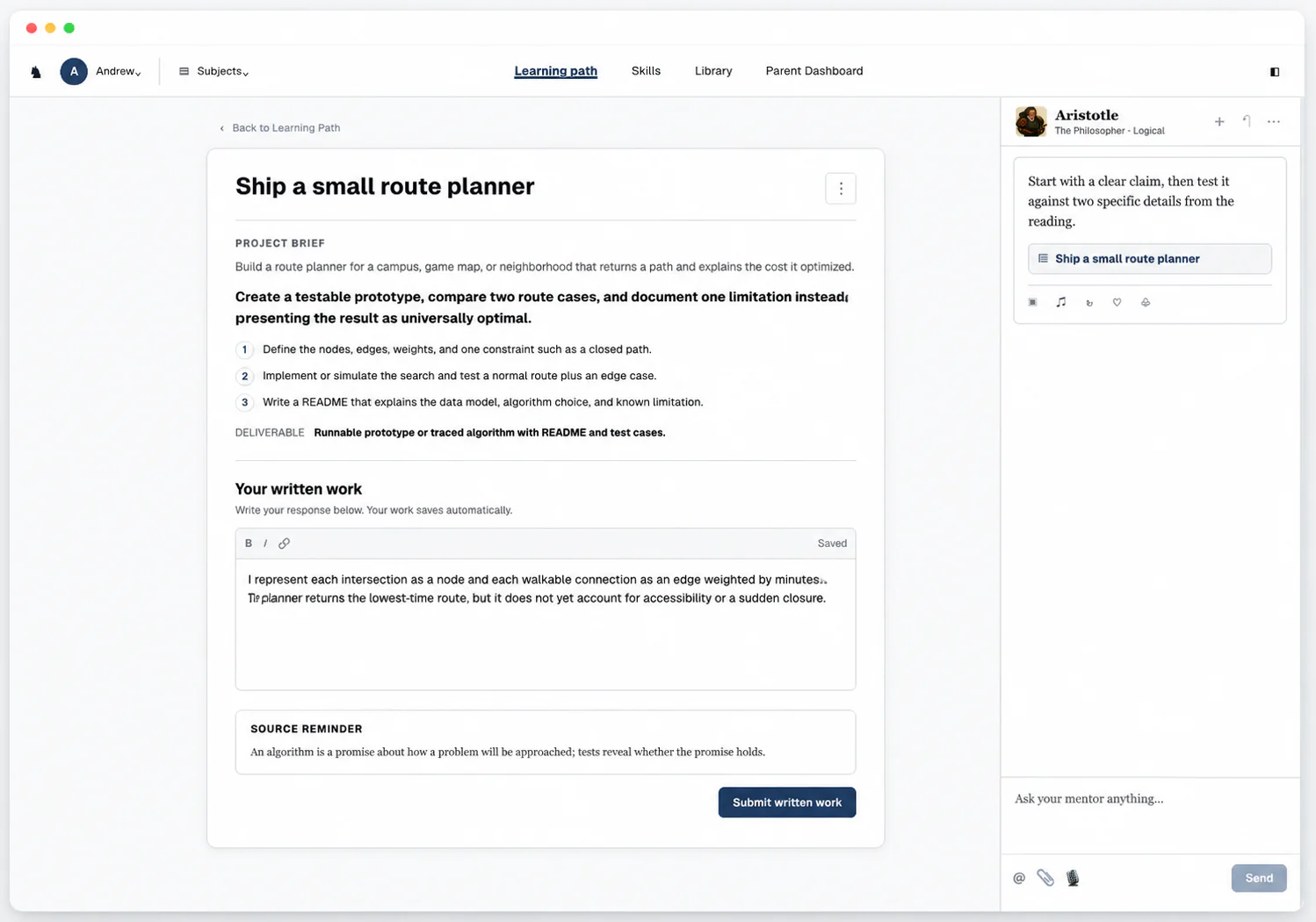
Build a route planner for a campus, game map, or neighborhood that returns a path and explains the cost it optimized.
- Hand in
- Runnable prototype or traced algorithm with README and test cases
Your parent dashboard
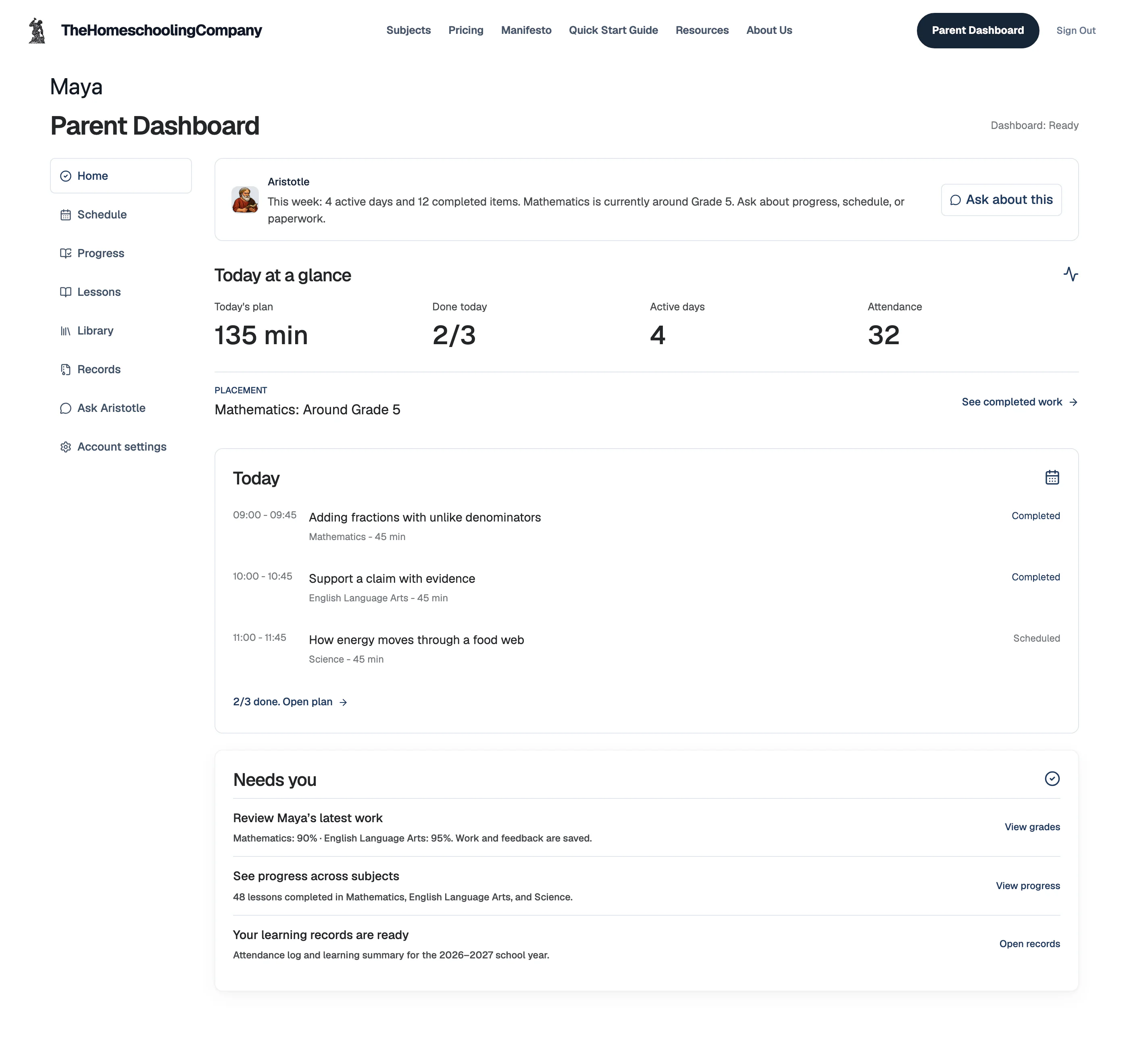
- Today
- Each subject's lesson, and whether it's done
- Grades
- Every submission graded instantly, with written feedback, so you never grade
- Records
- Attendance log and learning summary, ready to export
Units and skills
Provides a standards-aligned CS pathway that can support both creative projects and later AP Computer Science readiness. Computer Science is one skill tree for every grade with 12 units, from computational thinking and decomposition to software project capstone, and your child's grade sets how deep each unit goes.
Computer Science12 units · 60 skills
Computational thinking and decomposition5 skills
- Define the vocabulary, boundaries, and common misconceptions of Computational thinking and decomposition
- Explain the main actors, mechanisms, sequence, and constraints in Computational thinking and decomposition
- Interpret evidence, data, cases, or examples connected to Computational thinking and decomposition
- Apply Computational thinking and decomposition to a realistic programming or systems problem
- Create a working technical artifact that justifies decisions about Computational thinking and decomposition
Programming fundamentals5 skills
- Define the vocabulary, boundaries, and common misconceptions of Programming fundamentals
- Explain the main actors, mechanisms, sequence, and constraints in Programming fundamentals
- Interpret evidence, data, cases, or examples connected to Programming fundamentals
- Apply Programming fundamentals to a realistic programming or systems problem
- Create a working technical artifact that justifies decisions about Programming fundamentals
Data structures and representation5 skills
- Define the vocabulary, boundaries, and common misconceptions of Data structures and representation
- Explain the main actors, mechanisms, sequence, and constraints in Data structures and representation
- Interpret evidence, data, cases, or examples connected to Data structures and representation
- Apply Data structures and representation to a realistic programming or systems problem
- Create a working technical artifact that justifies decisions about Data structures and representation
Algorithms and complexity5 skills
- Define the vocabulary, boundaries, and common misconceptions of Algorithms and complexity
- Explain the main actors, mechanisms, sequence, and constraints in Algorithms and complexity
- Interpret evidence, data, cases, or examples connected to Algorithms and complexity
- Apply Algorithms and complexity to a realistic programming or systems problem
- Create a working technical artifact that justifies decisions about Algorithms and complexity
Debugging, testing, and code quality5 skills
- Define the vocabulary, boundaries, and common misconceptions of Debugging, testing, and code quality
- Explain the main actors, mechanisms, sequence, and constraints in Debugging, testing, and code quality
- Interpret evidence, data, cases, or examples connected to Debugging, testing, and code quality
- Apply Debugging, testing, and code quality to a realistic programming or systems problem
- Create a working technical artifact that justifies decisions about Debugging, testing, and code quality
Web systems and apis5 skills
- Define the vocabulary, boundaries, and common misconceptions of Web systems and APIs
- Explain the main actors, mechanisms, sequence, and constraints in Web systems and APIs
- Interpret evidence, data, cases, or examples connected to Web systems and APIs
- Apply Web systems and APIs to a realistic programming or systems problem
- Create a working technical artifact that justifies decisions about Web systems and APIs
Databases and data modeling5 skills
- Define the vocabulary, boundaries, and common misconceptions of Databases and data modeling
- Explain the main actors, mechanisms, sequence, and constraints in Databases and data modeling
- Interpret evidence, data, cases, or examples connected to Databases and data modeling
- Apply Databases and data modeling to a realistic programming or systems problem
- Create a working technical artifact that justifies decisions about Databases and data modeling
Cybersecurity foundations5 skills
- Define the vocabulary, boundaries, and common misconceptions of Cybersecurity foundations
- Explain the main actors, mechanisms, sequence, and constraints in Cybersecurity foundations
- Interpret evidence, data, cases, or examples connected to Cybersecurity foundations
- Apply Cybersecurity foundations to a realistic programming or systems problem
- Create a working technical artifact that justifies decisions about Cybersecurity foundations
User interfaces and accessibility5 skills
- Define the vocabulary, boundaries, and common misconceptions of User interfaces and accessibility
- Explain the main actors, mechanisms, sequence, and constraints in User interfaces and accessibility
- Interpret evidence, data, cases, or examples connected to User interfaces and accessibility
- Apply User interfaces and accessibility to a realistic programming or systems problem
- Create a working technical artifact that justifies decisions about User interfaces and accessibility
Automation, scripting, and tooling5 skills
- Define the vocabulary, boundaries, and common misconceptions of Automation, scripting, and tooling
- Explain the main actors, mechanisms, sequence, and constraints in Automation, scripting, and tooling
- Interpret evidence, data, cases, or examples connected to Automation, scripting, and tooling
- Apply Automation, scripting, and tooling to a realistic programming or systems problem
- Create a working technical artifact that justifies decisions about Automation, scripting, and tooling
Ethics, privacy, and responsible computing5 skills
- Define the vocabulary, boundaries, and common misconceptions of Ethics, privacy, and responsible computing
- Explain the main actors, mechanisms, sequence, and constraints in Ethics, privacy, and responsible computing
- Interpret evidence, data, cases, or examples connected to Ethics, privacy, and responsible computing
- Apply Ethics, privacy, and responsible computing to a realistic programming or systems problem
- Create a working technical artifact that justifies decisions about Ethics, privacy, and responsible computing
Software project capstone5 skills
- Define the vocabulary, boundaries, and common misconceptions of Software project capstone
- Explain the main actors, mechanisms, sequence, and constraints in Software project capstone
- Interpret evidence, data, cases, or examples connected to Software project capstone
- Apply Software project capstone to a realistic programming or systems problem
- Create a working technical artifact that justifies decisions about Software project capstone
Questions parents ask
Which grades can use this Computer Science curriculum?
- One Computer Science skill tree serves grades 3 to 12, with course pages for 6th grade, 7th grade, 9th grade, 10th grade, and high school. Placement checks your child's current skills, so the first lesson can sit before or after their grade.
What should my child know before starting?
- Starting skills include basic computer skills, ability to follow multi-step instructions, and curiosity and willingness to experiment. If placement finds a gap, the course starts with those skills.
How much of the teaching do I do?
- None of it. The course explains each new idea and checks how your child uses it, while the mentor answers questions as they work. Every submission is graded as soon as it comes in, so you never grade it yourself.
Can I use the record for high-school planning?
- Yes. The subject record holds every graded assignment with its written feedback, ready to export. We generate a transcript from the course records, ready for you to sign.
Computer Science, taught around your child
Software work that proves the learner can think beyond the tutorial.
$49/month after the trial.